Posts

Showing posts with the label IOT

Switch ON/OFF LED via Bluetooth
Image
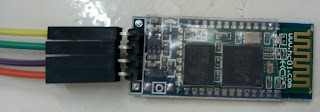
INTRODUCTION This tutorial will browse you through connecting an LED and controlling(On/Off) it via Bluetooth. Materials Required, Arduino Uno Board (1x) LED (1x) HC-05 or HC-06 Bluetooth Module Arduino terminal app  on Android  HC-06 Bluetooth Module Setup :  Connect VCC on HC-06 to 5V pin on Arduino Board. Connect GND on HC-06 to GND pin on Arduino Board. Connect TXD on HC-06 to TX pin on Arduino Board. Connect RXD on HC-06 to RX pin on Arduino Board. Connect positive pin on LED to pin 13 on the Arduino Board. Connect negative pin on LED to GND pin on the Arduino Board. Connect Arduino Board to PC via USB Upload the following code. Download Arduino Terminal app on Android Phone. Connect to HC-06 using  Arduino Terminal app . Enter 'n' to switch on LED. Enter 'f' to switch off LED. Arduino Code Connecting HC-06 Bluetooth Module to Arduino Uno Board Android Terminal Application

Arduino Family

Image
Arduino Uno  Great choice for your first Arduino. It has 14 digital input/ output pins, 6 analog inputs, a USB connection, a power jack, a reset button and more. Furthermore, contains everything needed to support the micro-controller. Simply connect it to a computer with a USB cable or power it with a AC- DC adapter or battery to get started.    Arduino UNO Arduino Mega UNO's big brother. It has 54 digital input/ output pins, 16 analog inputs, a USB connection, a power jack, and a reset button. As Arduino UNO, Mega contains everything needed to support the micro-controller. Simply connect it to a computer with a USB cable or power it with a AC- DC adapter or battery to get started. The large number of pins facilitates in handy for projects that require a bunch of digital inputs or outputs. Arduino Mega Arduino Leonardo First development board to use one micro-controller with a built-in USB. Cheaper and Simple. Board is handling ...

What is an Arduino?

Image
INTRODUCTION Arduino is an open-source platform used for building electronic projects. It consists of both a physical programmable circuit board, which is known as a Microcontroller and an IDE Arduino 1.8.2, which is used to write and upload computer code in to the physical board. Unlike previous programmable circuit boards, the Arduino does not need a seperate piece of hardware (called a programmer) in order to load the new code onto the board - you can use the USB cable. Furthermore, the Arduino IDE uses a simplified version of C++ which makes it easier for us to learn to program. Arduino UNO Arduino IDE (Version 1.8.2) WHAT'S ON THE BOARD? There are various Arduino Boards that can be used for different purposes. I've used the Arduino Uno board below, which is one of the most popular boards in the Arduino family and would be a great choice for a beginner. Power (USB Plug/ External Power Supply) ...