Posts

Showing posts with the label LED

Switch ON/OFF LED via Bluetooth
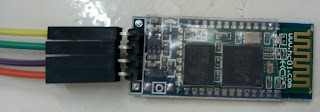
Image
INTRODUCTION This tutorial will browse you through connecting an LED and controlling(On/Off) it via Bluetooth. Materials Required, Arduino Uno Board (1x) LED (1x) HC-05 or HC-06 Bluetooth Module Arduino terminal app  on Android  HC-06 Bluetooth Module Setup :  Connect VCC on HC-06 to 5V pin on Arduino Board. Connect GND on HC-06 to GND pin on Arduino Board. Connect TXD on HC-06 to TX pin on Arduino Board. Connect RXD on HC-06 to RX pin on Arduino Board. Connect positive pin on LED to pin 13 on the Arduino Board. Connect negative pin on LED to GND pin on the Arduino Board. Connect Arduino Board to PC via USB Upload the following code. Download Arduino Terminal app on Android Phone. Connect to HC-06 using  Arduino Terminal app . Enter 'n' to switch on LED. Enter 'f' to switch off LED. Arduino Code Connecting HC-06 Bluetooth Module to Arduino Uno Board Android Terminal Application

Installing and Programming Arduino

Image
INTRODUCTION This tutorial will walk you through downlaoding, installing and testing the Arduino IDE . Note : I'll be following the steps on how to install and test Arduino IDE with Windows operating system. Requirements :  A computer (Windows, Mac or Linux) An Arduino Board A USB A-to-B cable Installing Arduino IDE Windows 10 Download the latest Arduino IDE for Windows Scroll down to "Download the Arduino IDE" In your right hand side, press on "Windows Installer" Press on "Just Download" After completing the download, launch the .exe file While installing allow Administration Access "Yes" After a sucessful installation, double-click on the Arduino desktop icon. Testing your Arduino Board Note : I'll be following the steps on Arduino UNO board. Open installed Arduino IDE Plug in the Arduino UNO board via USB Go to : File > Examples > 01.Basics > Blink Select the type of th...